> For the complete documentation index, see [llms.txt](https://sigafdocumenta.saude.mg.gov.br/llms.txt). Markdown versions of documentation pages are available by appending `.md` to page URLs; this page is available as [Markdown](https://sigafdocumenta.saude.mg.gov.br/relatorios/relatorios-sigaf/entradas/relatorio-situacao-de-entrada-de-nfe.md).
# Relatório Situação de Entrada de Nfe
## Acesso ao Relatório
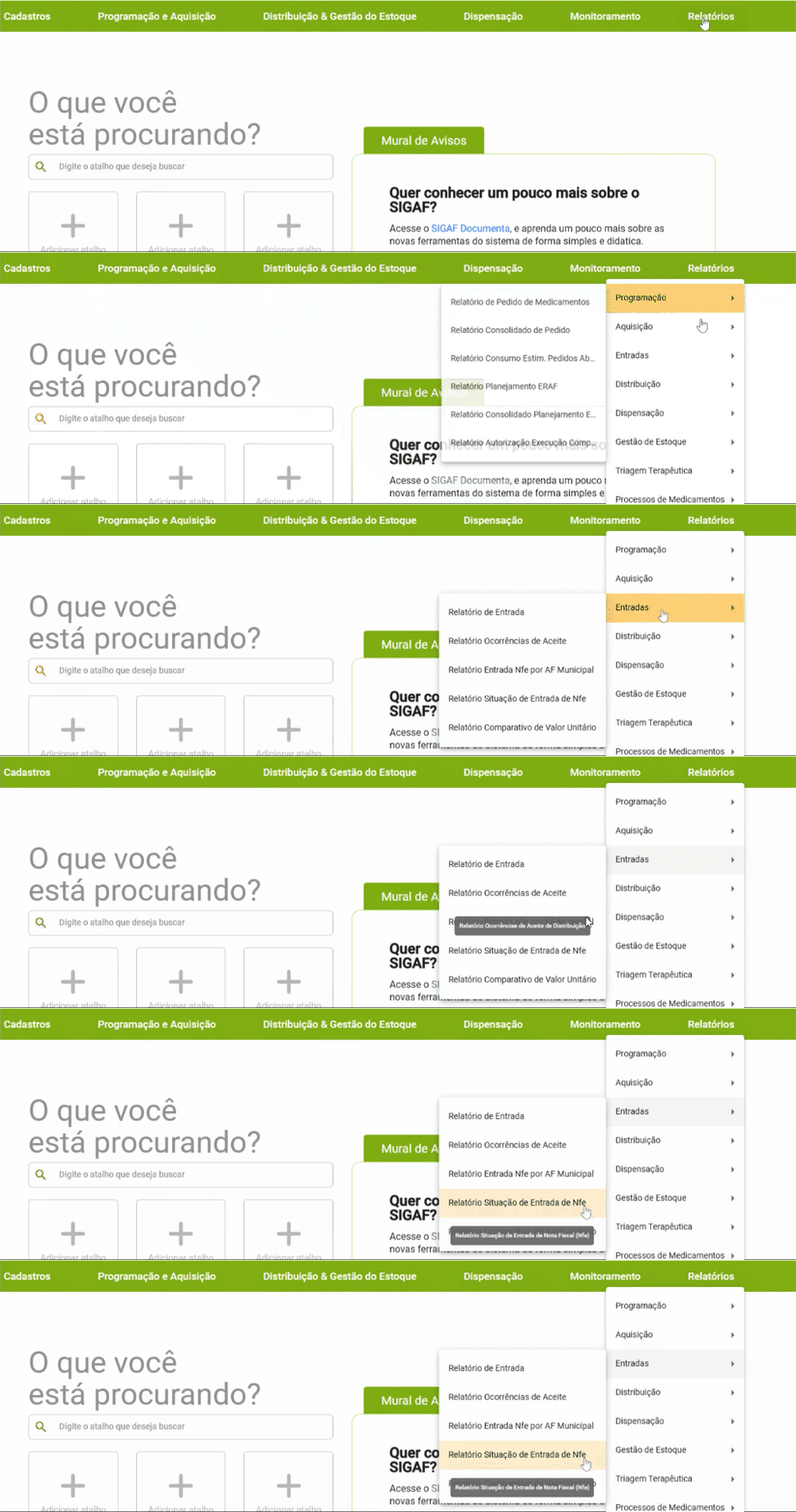
Caminho no [SIGAF](https://sigaf.saude.mg.gov.br/):
Relatórios > Entradas > [Relatório Situação de Entrada de Nfe](https://antigo-sigaf.saude.mg.gov.br/?page=meta/view\&id_view=rel_situacao_nota_fiscal&_menu_acessado=796)
## Sobre o Relatório
Quem consegue acessar este relatório?
Esse relatório pode ser acessado pelos usuários ativos no SIGAF com os seguintes níveis de acesso:
* [x] Atendente
* [x] Atendente Almoxarifado
* [x] Farmacêutico Municipal
* [x] Farmacêutico Regional
* [x] Farmacêutico SAF
* [x] Gerente Almoxarifado
* [x] Gestor Estadual
{% hint style="info" %}
Se o acesso for **nível municipal** e **gerente almoxarifado**, visualiza apenas o seu estabelecimento.
Se for **regional**, visualiza tanto o seu estabelecimento quanto os que estão sob sua jurisdição.
Já o **nível central** têm acesso aos dados de todo o Estado.
{% endhint %}
Qual é a finalidade do relatório?
Este relatório permite acompanhar a situação das Notas Fiscais de Entradas Simples registradas no sistema. Abrange aquisições com recurso próprio e, no caso do nível Central, também inclui as cargas recebidas do Ministério da Saúde e/ou de outros entes, como secretarias estaduais ou instituições parceiras.
Ele possibilita verificar se a nota foi devidamente registrada, seu status de conferência e demais informações relacionadas ao processo de entrada.
Em quais situações o relatório é mais útil?
Este relatório é especialmente útil em situações que envolvem:
* Acompanhamento de entradas simples de medicamentos, no que compete à Nota Fiscal.
## Como Explorar e Interagir com o Relatório?
Quais filtros estão disponíveis?
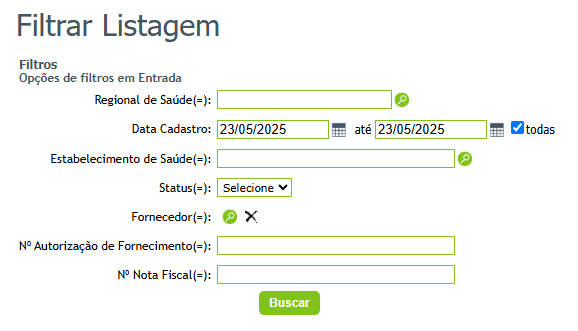
Confira a seguir os filtros disponíveis para extrair esse relatório:
{% hint style="info" %}
O campo "todas" que aparece em "Data Cadastro" ao ser selecionado retorna os dados de todas as datas disponíveis. Para pesquisar períodos específicos desabilite esse campo.

{% endhint %}
É possível exportar o relatório? Em quais formatos?
Não é possível extrair esse relatório, apenas consultar no SIGAF.
Quais informações aparecem no relatório exportado (CSV)?
* [x] Data Cadastro
* [x] Estabelecimento de Saúde
* [x] Status Fornecedor
* [x] Nº Autorização de Fornecimento
* [x] Nº Nota Fiscal
* [x] Descrição pendencia
---
# Agent Instructions
This documentation is published with GitBook. GitBook is the documentation platform designed so that both humans and AI agents can read, navigate, and reason over technical content effectively. Learn more at gitbook.com.
## Querying This Documentation
If you need additional information that is not directly available in this page, you can query the documentation by asking a question.
Perform an HTTP GET request on the following URL with the `ask` and `goal` query parameters:
```
GET https://sigafdocumenta.saude.mg.gov.br/relatorios/relatorios-sigaf/entradas/relatorio-situacao-de-entrada-de-nfe.md?ask=&goal=
```
`ask` is the immediate question: it should be specific, self-contained, and written in natural language.
`goal` is what the user is ultimately trying to achieve, the reason they need the answer. Sharing it helps GitBook give you a better, more relevant answer. A goal is most helpful when it describes the outcome the user wants rather than restating the question. For example, with `ask=how do I create an API token`, a goal like `automate deployments from our CI pipeline` lets GitBook tailor the answer to that use case.
The response will contain a direct answer to the question and relevant excerpts and sources from the documentation.
Use this mechanism when the answer is not explicitly present in the current page, you need clarification or additional context, or you want to retrieve related documentation sections.